Friday Night Database Recovery Crash Course (A True Story)
Friday Night Wojak … set the log statement to all … RM rf log directory slash star … log directory slash star became a slash a star … His soul left his body … Write ahead Log … point in time recovery … Backup is only a backup if you test that restoring it … RPO and RTO … This is called alert fatigue … every alert should be actionable … Who's responsible for this? … In fact, I did it myself
In this video
Click any line to see what was on screen · double-click to watch from thereChapter 1: A Friday night incident
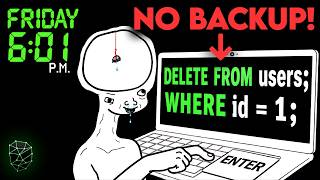
0:0010:40 p.m. 0:02Friday Night Wojak is trying to fix a storage issue on production database, but instead he ends up deleting the entire thing and they don't have a backup. 0:10I mean, a backup job runs every night, but somehow there's still no backup. 0:16Now, there are multiple lessons in this story. 0:18Any of them could have changed how things ended for Wojak. 0:22I know this because I've been running different types of databases in production for years now at companies of all sizes, and I've deleted the production database myself. 0:31So everything you see in this video is based on a real experience with real tools along the way. 0:36We'll cover the mistake that led to this and what could have saved everyone's weekend. But first, let's go back a few hours.Chapter 2: Friday afternoon
0:44It all started on a Friday afternoon. It was almost 6 p.m. 0:48and everyone was leaving the office to start their weekend except Wojak. 0:51He was sitting there staring at his screen, looking at the SQL statement he was about to run on production database. 0:58He got hired at this startup three months ago as a junior backend engineer. 1:03It was another one of those AI driven customer support slash lead generation of startups. 1:08It took Wojak seven months of sending resumes every single day to land this position. 1:13So in his mind, he could not afford to lose this opportunity. 1:17And for these three months, he's been using AI coding tools heavily, and it worked pretty well for him. 1:22He deliver more tasks than anyone else on the team, and that gave him a lot of confidence, maybe a bit too much. That morning he ran into Mr.Chapter 3: The CEO's request and log_statement
1:30CEO in the elevator. Wojak, right. 1:33I've heard a lot of good things about you. 1:36Hey, I saw this post on LinkedIn the other day. 1:39Apparently, if we get ISO certified investors take you way more seriously. 1:44The thing is, to get certified, you need a record of every change that happens in your database. 1:50It's not urgent, but you think you could make that happen. 1:54Now, it didn't take Wojak a long time to come up with the SQL statement for this. 1:58Or rather, he just asked ChatGPT how to keep track of every query that runs against a PostgreSQL database. 2:06The simplest way is to enable statement logging, set the log statement to all and reload the config. He tested this exact 2:13statement on the test environment on a test database almost identical to the one running on the production, and it was working. 2:21So he connected to the production database, pasted the same two lines, and sat there with his finger on the Enter key. Wojak... Wojak! 2:30It's already 6 p.m.. Aren't you leaving? Yeah, I was about to leave. Just finishing my task. 2:36Bro, you're making the rest of us look bad by doing so many tasks. Take it easy on yourself. Burnout is a real thing. 2:44The only thing Wojak is thinking about right now is finishing this task today. 2:48So on Monday, he can walk up to the CEO and say, done this query. 2:52Just add more verbosity to the logs, he thinks. 2:55Besides, I already tested this on the staging, so. Must be safe. 3:06For about 4.5 hours later, Wojak received this alert from the production alerts channel in a slack critical production database.Chapter 4: The disk space alert
3:16Volume is running out of his space. 3:17Current usage is at 91% and the action required section. 3:22He sees this line check for huge log files. He also sees the graph. 3:26Disk usage has been slowly increasing for weeks and sat around 77%. 3:32And then at 6:01 p.m., a sharp increase is straight up to 91%.Chapter 5: Self-hosted Postgres on Kubernetes
3:38You see, their production PostgreSQL database is not on a managed service like AWS. RDS. It's self-hosted. 3:44It runs on their own servers inside a Kubernetes cluster right alongside the application itself. Actually, they used to be on RDS. 3:52About a year ago. 3:54They migrated to this self-managed Postgres to save money. 3:57Remember that they created a 250 gigabyte the storage volume, and connected this storage space to the database pod 4:05under the slash mnt slash database volume address. 4:09They also configured Postgres to store both the data and the logs on the same volume. 4:14Now think about what Wojak did four hours ago. 4:17He set the log statement to all, which means from that moment on, Postgres writes every single SQL statement. 4:25It executes is straight to that log directory. And this is production. There's a lot of traffic. So the volume is started filling up fast. 4:34Back to Wojak.Chapter 6: Deleting the log files
4:35He takes a screenshot of this alert, pasted into ChatGPT and asks, what should I do? ChatGPT says to treat this as urgent. 4:42First find out what is consuming this space and gives him a disk usage command. 4:47So Wojak attaches a terminal to the production pod and runs the disk usage command. 189GB in the data directory, 38GB in the logs directory. 4:58He passes the result back to ChatGPT. The log files are safe to delete. 5:03Postgres doesn't need them to run delete them to free up a space. 5:07Now Wojak has zero experience maintaining a production database, but right now he's not thinking about that. He's thinking about his reputation. 5:15He made a mistake. He doesn't want anyone to know. 5:18If I fix this quickly, he thinks nobody will find out. So he start pasting the commands. One by one. 5:25He set the log directory variable, verifies this point to the right directory, and lists the log files. 5:31Then he goes back to ChatGPT to copy the final command The remove command. 5:36But while he's doing that his sessions times out error lost connection to pod. 5:41He attaches to the pod again gets a fresh shell session and paste the command he already copied. 5:47RM rf log directory slash star and presses. Enter. The command hangs for a second. Good.Chapter 7: rm -rf on an empty variable
5:56He thinks it's working, but then he starts seeing errors. Cannot remove dev/mq cannot remove etc hostname. 6:04He doesn't understand why this command. 6:06Trying to remove files under dev or under etc paths. So he does what he always does. 6:12He copies the error and paste them into ChatGPT. 6:16ChatGPT starts quote unquote reasoning and shortly after responds Stop the command. Right now press Ctrl c in the terminal. 6:25Immediately you see he saved the log folder path in a temporary variable, the log directory variable. 6:31When his first terminal session timed out, the temporary variable was wiped in his new terminal session, the log directory was 6:39completely blank, so log directory slash star became a slash a star, 6:47which means deleting everything from the root directory up. His soul left his body. 6:52He jumps back to the terminal and smashes control. C harder than he ever did in his life. The command stops. He types ls ls command not found. 7:01Even ls is gone. He effectively nuked the database. It's 10:45 p.m. now.Chapter 8: Incident response and communication
7:07He receives a wave of alerts on his slack. Database is down. Application is down. Health checks are failing. 7:13And then people start posting in the general channel. Is the app down for anyone else? Customers are emailing us at 10:49. 7:20He goes to the developers channel, mentions everyone and writes we have a production incident. 7:26He creates a Google meet, paste the link in the thread and joins the call. 7:30Now here's the first mistake in the incident response itself. 7:33People in the general are asking what's going on and nobody's answering them. 7:38Communication is one of the first principle of the incident response. 7:42You keep the rest of the company and your customers updated about the status at all time. 7:47Even if this status is, we don't know yet. Silence is the worst. Update 20 minutes pass and nobody joins. At 11:09. 7:56He calls Zoomer the DevOps engineer and George the tech lead. 7:59Shortly after, they both join Wojak. What happened? 8:04I might have accidentally deleted the entire production database. You did what? 8:10I deleted the root directory of the production database, and. 8:13He proceeded to explain exactly how it happened. It's 11:13 p.m.. 8:18Production has been down for 28 minutes after short back and forth they split the work. 8:23George takes care of communication and Zoomer restore the database from this morning's backup. Now. Luckily they do have backups.Chapter 9: Daily backups and the lost day
8:31Every morning at 4 a.m., an automated job copies the entire database into a single backup file and uploads it to a S3 bucket on AWS. 8:41But here's the thing the backup was taken at 4 a.m. 8:45on Friday, and the incident happened at 10:45 p.m., so all the Friday data is gone and they could have avoided that.Chapter 10: Write-Ahead Log and Point-In-Time Recovery
8:53You see, before Postgres changes any data on the disk, it first record what it's about to do in a running diary. 9:01called the Write ahead Log. 9:03If Postgres crashes, it reads this diary and re-applies the changes to recover. 9:08Now imagine if you save a copy of this write ahead log files somewhere safe, like an S3 bucket. Then you have a recovery method. 9:16Way better than just daily database dumps. It called a point in time recovery. You take your last full backup. 9:23You replay the write ahead log on top of it, and you tell it to stop, say, at 10:43 p.m., one minute before the data was deleted. 9:31On a managed service like RDS. 9:33There is essentially a single checkbox to enable point in time recovery. Now back to Zoomer.Chapter 11: No restore procedure
9:39Zoomer is fairly new in his DevOps role too, and right now he's searching in Notion for a database recovery guideline because he's not sure 9:46which S3 buckets the backups are in, or how to even start a restore. 9:51The only page he finds was updated a year ago, and it's about restoring the backup on the RDS. 9:56The way the database was set up before completely useless with their self-hosted Postgres now. 10:01So now he has to dig through the S3 buckets in the AWS console, hoping to recognize the right one by its name. 10:07He also needs to piece together a restore procedure by googling and asking ChatGPT.Chapter 12: Restore drills, RPO and RTO
10:13So lesson number one no matter where you work and what's the size of your company, you need to have a database backup and restore 10:20procedure document that clearly explains a step by step. 10:25How are backups are created and how do you restore them. 10:28But that document alone is not enough yet. 10:31Backup is only a backup if you test that restoring it. 10:34So you need to run restore drills, say at least once a year. 10:38During the drill, you restore a fresh database from your backup, following your documentation, and make sure everything works. 10:45You also want to keep track of two numbers. RPO and RTO. RPO is the recovery point. 10:51Objective It's the maximum amount of data loss you can tolerate measured in time. 10:56For example, taking a daily backup at 4 a.m. means an RPO of up to 24 hours. RTO is a recovery time objective. 11:04It's how long your system can be down before it's severely damaged the business. Now, these are business decisions. 11:10So you agree on these targets with the management of your company, and then you design your backups around them.Chapter 13: No backup for 12 days
11:16Meanwhile, back on the call, it seemed like Zoomer found a backup bucket. But there is a problem. I can't find today's backup. 11:24Actually, the latest backup I see here is from 12 days ago. Try changing the sort order. No, nothing. 11:32They refused to believe it, but unfortunately, it's true. Here's what happened. 11:36The database was growing all the time, and the backup job had a timeout of 30 minutes. 11:4112 days ago, the database got big enough that the backup job couldn't finish in 30 minutes. So Kubernetes killed the job. 11:48And the same thing happened every day after that. 11:51Now they're getting alerts about this every day in the dev alerts channel in a slack warning job production Postgres backup failed. 11:59Reason deadline exceeded. 12:01But the channel gets hundreds of other alerts every day as well. 12:05Most of those alerts are either not configured properly or they shouldn't exist in the first place. 12:10So one alert that actually mattered scrolled by 12 days in a row and no one reacted to it. This is called alert fatigue.Chapter 14: Alert fatigue
12:17It happens when you receive so many alerts that you stop paying attention to any of them. 12:22Your brain get conditioned that a red icon in the slack means nothing, because the last 100 red icons meant nothing. 12:30So here's the rule every alert should be actionable if no immediate action is expected. 12:35When it's fires, either delete it or turn it into a dashboard. It's almost midnight.Chapter 15: The CEO joins the call
12:41The only option left is restoring the backup from 12 days ago, which means all customer data leads, and activity from the past 12 days is gone. 12:51Before we do this, I need to call Mr. CEO and tell him what we're. About to do. Five minutes later, Mr. CEO joins the call. 12:59What happened here? 13:00They explain everything and then complete silence. Nobody says a word. All the hope is lost. Only a miracle can save their weekend. 13:08And suddenly Mr. CEO breaks the silence. Don't worry, kids, I have a backup. 13:14He reaches into his back pocket and pulls out a USB drive. It says please subscribe. Except that didn't happen. What actually happened is Mr. 13:23CEO asked the worst question one can ask in this situation. Who's responsible for this? 13:29Whoa, Jack, didn't I say this wasn't urgent? Why did you do this? Why? 13:34And right before he leaves the call, he says I. Want all of the data back now. I don't care how. It's 12:15 a.m..Chapter 16: Restoring from a 12 day old backup
13:43Everyone is exhausted and stressed after a few minutes of discussion, they come up with a plan, restore the backup from 12 days ago, 13:50then try to fill the missing data gaps from the other sources. 13:53For example, pull user accounts and emails from Google Analytics, fetch subscription details from Stripe, and so on. They know they won't recover everything. 14:02Messages, leads. 14:03Most of it is lost for good, and they know they'll spend the entire weekend writing custom scripts to stitch the data together. 14:10But at this point, there is no other option. So Zoomer restarts the database pod. 14:14This is now a brand new, completely empty database. 14:18Then he attaches the terminal and tries to pull the old backup from S3. 14:22And needless to say, he's following instructions from ChatGPT and he ran into one problem after another. 14:28The database container doesn't even have a tool installed to download files from S3. 14:33Then he realizes the backup bucket is private and the database pod has no access to it. So he has two options. Do it properly. 14:40Create a IAM role that grants the pod access to the bucket, or do it in the dirty, quick way. Make the bucket public. 14:47Pull the backup file and make it private again afterwards. 14:50Which, by the way, opens a security hole for the company. 14:52If he forgets to make it private again and again. This is exactly why you prepare for this. 14:57Because when you're in an incident with all of that stress and pressure, it's so easy to make a mistake, and each mistakes cascade into the next one and make the situation worse.Chapter 17: Rotating shifts
15:07They spend the next three hours until 3 a.m. trying to restore what they can. Zoomer is exhausted. 15:13He can't focus, and he keep making mistakes, which makes everything take even longer. Here's another lesson. 15:19If you're in a long running incident like this one, you need a team members who can rotate shifts. 15:24One person actively working on recovery while the others rest. A tired engineer is a dangerous engineer, so they decide to end the call, get some sleep, and rejoin at 6 a.m. 15:35with more backend and data engineers. 15:37They're also telling Wojak he doesn't need to stay on call anymore. 15:40Long story short, the team worked through almost the entire weekend. 15:44By Sunday evening, they finally bring the application back online with partial data. 15:49So I guess we can say that the incident was quote unquote resolved after 45 hours, because if they brought it up on the 12 days old 15:57data, new signups and new leads would grab the IDs that the backup scripts were about to reuse. It's Monday at 9 a.m..Chapter 18: Monday morning
16:05Wojak gets ready to go to the office. 16:07He's been following the team messages in a slack all weekend, watching them cleaning up the mess. 16:12It was easily the worst weekend of his life. 16:15He's at the door and he gets the email notification. It's from Becky in HR. 16:20CC'd Legal and Mr. CEO. 16:22Hi Wojak following a review of Friday's production incident. 16:25We have decided to terminate your employment effective immediately. 16:28The severity of the outage and associated risk do not align with our current risk profile. 16:34I wish this was otherwise, but people make mistakes. 16:36They might delete the production database. In fact, I did it myself. 16:40And when it happens, you want to be ready for it. 16:43So it's best for us to learn from each other's mistakes instead of making them ourselves. 16:48So if you have an experience like this or any advice, leave it in the comments below and help save a fellow engineer's weekend. 16:54Anyways, thanks for watching and see you in the next one.Timestamps open the video at that moment on YouTube. ~ means about then: the paragraph starts partway through one of YouTube’s lines.